thumbnail

Can Scientists 'Upload Knowledge' Directly into your Brain to Teach New Skills?


Download

Can Scientists 'Upload Knowledge' Directly into your Brain to Teach New Skills?


Imagine the world where you do not have to make any efforts to learn new skills or knowledge.


Just like new programs are uploaded to a Robot to teach them new skills, What if new skills are uploaded to your brain to make you learn, say, playing Guitar, a whole language like French or German or anything else you wish?


Do you want a technique, if exists, to make this possible?


Of course, YES! Who would not?


Now, multiple media channels are reporting that a team  of researchers from HRL Laboratories in California has developed a new technology that could be used to feed any skill into the human brain without much effort.


But, Is it possible in reality?


Let's have a look at what media is reporting and what scientists have actually discovered.


Here's what Media is Reporting:


Media is reporting that researchers have found a way to "upload knowledge to your brain." Researchers claimed to have developed a simulator that can feed data directly into a human’s brain to teach new skills in a shorter amount of time.


Some are reporting that the technique is similar to that seen in 'The Matrix,' in which Keanu Reeves learns'Kung-Fu' soon after a program is uploaded directly into his brain through a terminal.


Here's what Scientists have Actually Discovered:


In reality, the recent research shows that it may be possible to enhance a human's existing ability to learn new skills, but to upload any particular skill or talent directly into a person via brain waves is outside the scope of the study.


What Did the Scientists Actually Achieve?


Lead by Matthew Phillips, the HRL Labs research team that does R&D for the Boeing Company and General Motors has made use of a neuro-stimulation technique called transcranial Direct Current Stimulation (tDCS) – a noninvasive, painless shock that makes use of a constant, small electric current to excite specific brain regions.


Using tDCS technique, the researchers excited certain areas in the human brain that are responsible for learning and skill retention.


"When you learn something, your brain physically changes," Philips said. "Connections are made and strengthened in a process called neuroplasticity. It turns out that certain functions of the brain, like speech and memory, are located in very specific regions of the brain, about the size of your pinky.


"During their experiment, the researchers first monitored the brain waves of 6 commercial as well as military pilots and then transmitted those patterns into 32 newbies who were learning to pilot an aeroplane in a flight simulator.


The finding suggests that tDCS technique might work to enhance a person's ability to learn, as the newbies who received tDCS brain stimulation were found with improved piloting abilities, especially landing skills.


However, this definitely does not mean that the researchers uploaded or transmitted any particular skill or type of data via this technique, rather they just excited the specific brain regions responsible for learning, so that a person could improve his/her learning ability.


So, don’t think that using this new technique you could "upload" an entire skill set, like Kung-Fu or French language. For now, you have to make efforts to learn them but, who knows, the study could just be a first step towards this whole new FUTURE.


For in-depth knowledge, you can read the full research paper published in the journal Frontiers in Human Neuroscience.

                                               ☺☺☺

thumbnail

Warning! CCTV Cameras Sold on Amazon Come with Pre-Installed Malware


Download


Warning! CCTV Cameras Sold on Amazon Come with Pre-Installed Malware.   

 Be careful while buying any off-brand electronics from Amazon, as they could end up infecting you.


Recently, independent security researcher  Mike Olsen  discovered that the CCTV surveillance devices sold on Amazon came with pre-installed malware.


Olsen discovered this nasty secret after he bought a set of outdoor CCTV surveillance cameras from Amazon for one of his friends.


He picked Sony Chip HD 6 Camera 1080P PoE IP CCTV surveillance camera kit sold by the Urban Security Group (USG) on Amazon, as it had good reviews and was a relatively cheap set of 6 cameras with all necessary equipment included.


While helping his friend set up the cameras, Olsen logged into the administrator panel to configure the surveillance system and found that the page hosted  "no normal controls or settings."


Assuming that it might be bad programming, Olsen opened up the browser's developer tools and was surprised to discover a hidden iFrame loaded at the bottom of the body tag, retrieving content from  Brenz.pl.


Surveillance Camera Comes Pre-Installed with Malware


A quick Google search revealed that the Brenz.pl domain was used in malware distribution campaigns, according to a blog post by cyber-security vendor  Sucuri in 2011.


In short, this means that the newly bought surveillance camera kit could be infected with malware anytime, when the Brenz.pl operator decides to push malicious code to the DVR's backend through the hidden iFrame.


Once the CCTV camera's operator accessed that page, the malware would be downloaded and installed, potentially leading to unlawful spying and data theft.


Since the Breza.pl domain was already on the firmware,there might be other nasty malware included in the firmware as well, that does not provide the camera's owner to access the backend.


The malware distributed by the surveillance cameras can have the ability to hijack video feeds or make the customer's camer as part of a DDoS Botnet, something that happened last year. 


So be careful what you buy. Check reviews of every product before buying, even if the product brand and the eCommerce platform is trusted.


                                  ☺☺☺
thumbnail

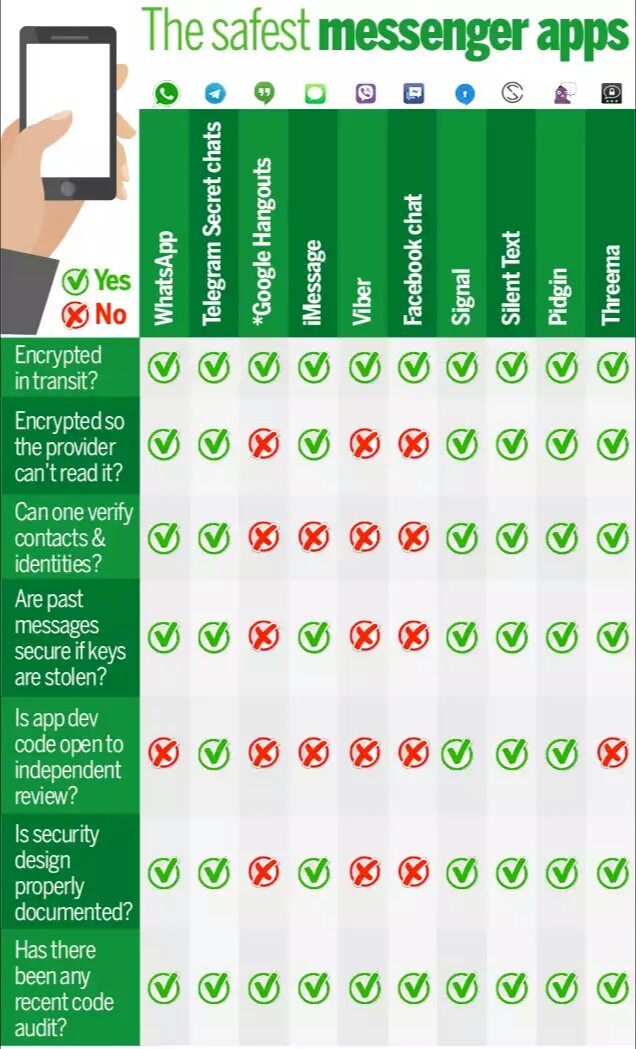
Do you know wich one is a safest messenger App ?


Download

thumbnail

WhatsApp is now probably illegal in India


Download


WhatsApp is now probably illegal in India.
WhatsApp turned on encryption within the app. This means, by default, if you are using the latest version of WhatsApp all your communication through the app will be encrypted. This also - probably, and that is a big probably - makes WhatsApp illegal in India. The reason? Our IT laws and rules are so outdated that a case can be made against WhatsApp because now it is using 256-bit encryption by default.


This is legally a grey area and given the fact that WhatsApp is popular in India, the government may not go after it, but in theory it can very well declare the chat app illegal. None of the Indian IT-related regulations permit 256-bit encryption in private services. Although, none of them also specifically outlaw it. But there are some guidelines issued by Department of Telecommunications, which the government can use to term WhatsApp illegal.

According to rules issued by DoT in 2007, License Agreement for Provision of Internet Service (including Internet Telephony) mandates that private parties in India cannot use encryption that is higher than 40-bits without explicit permission from the government.


Also, the permission is granted only if the entity that intends to use encryption submits decryption keys to the government, which in the case of WhatsApp is going to be impossible because it has implemented the encryption in a way where even WhatsApp doesn't have the keys.

Now, the interesting bit here is that WhatsApp is not an ISP and neither it needs any DoT licence to offer its services in India. So it is not clear if the encryption rules formulated by DoT apply on it or not. Although, due to the lack of clarity in this matter, if the government wants, it can clearly chase WhatsApp out of the country with its 40-bit stick.


India is, however, in the process of formulating some sort of coherent encryption policy. Last year, the governmentfloated a draft proposal for the use of encryption in India. It was a bad bad draft, which government pulled back because of criticism. One of the suggestions in the draft was that people using encrypted services will be asked to keep the decrypted data for at least 90 days. If something like that makes its way to whatever new policy the government comes up with, it will definitely make the WhatsApp illegal, especially after its decision to turn on strong encryption by default for all users across the world.

thumbnail

How to Unlock Pattern Lock or Password In Android Smartphone Without Losing Data


Download

How to Unlock Pattern Lock or Password In Android Smartphone Without Losing Data


Android is the most used Mobile OS in the world and Engineers from Google work so hard to make it more secure after every update. If you ever forget your mobile pattern or password you can reset your mobile and get your device back. But in this case you will lose all your data if you want to recover  your device without losing data. Follow the below steps. Hope this article will help you.


Method 1st  :-


Unlock Pattern Lock On Android Without Losing Data


☆ Download Aroma File Manager.

☆ You android device either locked by pattern lock or password lock.

☆ A memory card for android device.

Step 1.  After downloading Aroma File Manager, place it in your memory card (SD card). Insert the memory card into your locked android device.


Step 2.  Open Stock Recovery Mode with reboot your android device and pressing Power Key and Volume up key simultaneously. Different phones may be have different methods to open stock recovery mode so if you face any problem Google it.


Step 3.  After entering into recovery mode use Volume+ and Volume- buttons to scroll up and down. For select use middle button.


Step 4.  From there click on “Install Zip from SD Card” and give a path to install “Aroma File Manager” from SD card.


Step 5.  After installing, it will open in recovery mode.


Step 6.  From the Aroma File Manager navigate to settings >> go to bottom and click on“Automount all devices on start” and then exit.


Step 7.  Repeat Step 4 & 5 again.


Step 8.  After this you will get “Aroma File Manager” opened again.


Step 9.  Now navigate to Data Folder >> System Folder  and find >>

“gesture.key”or“password.key” for pattern lock or password lock respectively.


Step 10.  Delete that any one file and then exit aroma file manager and reboot your android device. After rebooting you will notice that password or pattern lock not removed. But don’t worry draw any pattern and you will open your android device but remember or note that pattern.


Method 2nd  :-


Unlock Pattern Lock On Android Without Losing Data

1. First Requirement is Download Android SDK and here I will show you How To download and install Android SDK Tools.


☆ Download and install Android SDK Tools  to run ADB commands. Now select platform according to your download and install it.

☆  After installing open it, unchecked the other packages and check Android SDK Platform-tools and then click on install packages according to the image given below.


2. So the other requirement is USB Debugging should be enabled before your android device is locked.


3. The process will not be helpful if you doesn’t have specific and compatible drivers for your phone. So you should be very careful While installing your device compatible drivers.

Steps To Unlock Android Pattern Lock


Step 1. Connect your locked android phone with PC/Laptop via USB.


Step 2. Open folder where you installed Android SDK Tools Users >> App Data >> Local >> Android >> Android-SDK >> Platform-Tools and then click on blank space hold shift and click right mouse button and select “open command window here”.


Step 3. It will open you command window now you have to put some commands in the command window  :-

For check your device is connected or not put command:-


adb devices


Now put these commands:-


                               adb shell
  cd/data/data/com.android.providers.settings
                             /databases
                     sqlite3 settings.db
       update system set value=0 where                                   name=’lock_pattern_autolock’; 
      update system set value=0 where          name=’lockscreen.lockedoutpermanently’;
                            .quit

If above commands not working put:-


               ad shell rm /data/system/gesture.key

Step 4. Once you done you have rebooted your android device. Now its all done.
After rebooting your device you will see the pattern lock disabled. So in this method USB Debugging should be enabled before locked and it is must. But If it is not enable then you cannot proceed further steps.


Method  3rd  :-


Unlock Pattern With Factory Settings (Data Will Lost)

If you don’t have a PC or if USB Debugging is not enabled then follow the below steps

Step 1. First Switch off your Locked Android Device.


Step 2. Now, boot your Android device into “Recovery Mode” using specific keys by holding power key and volume up key simultaneously.


Step 3. After opening Recovery Mode

 ☆ Select “Factory Data Reset” option and give “Yes“.
☆ Select “Wipe Cache Partition” to wipe cache data.


Step 4. After above steps Reboot your device.


Step 5. All Done ! Now, your device will start from the scratch.


Please don’t try to use this information to Hack someone’s mobile.


Sora Cart

Lorem ipsum dolor sit amet, consectetur adipiscing elit. Nulla elementum viverra pharetra. Nulla facilisis, sapien non pharetra venenatis, tortor erat tempus est, sed accumsan odio ante ac elit./p>